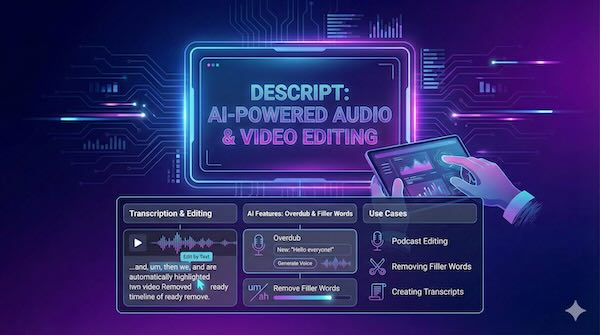
Descript has established itself as a pioneering force in content creation by fundamentally reimagining how creators edit audio and video. Rather than wrestling with traditional timeline-based editors, users can edit their media as easily as editing a text document—a paradigm shift that's made professional-quality production accessible to podcasters, YouTubers, marketers, and educators alike.
How Transcription-Based Editing Works
At the core of Descript's approach is automatic transcription. When you upload or record audio or video, the platform generates a synchronized text transcript with approximately 95% accuracy, supporting over 22 languages. The magic happens when you start editing: delete a word from the transcript, and the corresponding audio or video is removed automatically. Rearrange sentences in the text, and your media follows suit.
This text-first methodology eliminates the need to scrub through waveforms hunting for specific moments. Instead, you can search, highlight, and manipulate content using familiar word-processing actions—cut, copy, paste, delete. For creators who spend hours trimming interviews or tightening podcast episodes, this represents a dramatic efficiency gain.
Overdub: AI Voice Cloning for Seamless Corrections
One of Descript's most distinctive features is Overdub, its AI voice cloning technology powered by Lyrebird AI. The system allows you to create a digital replica of your own voice, then generate new audio simply by typing text.
The practical applications are significant. Mispronounce a word during recording? Rather than scheduling another session, you can type the correction and let Overdub regenerate that segment in your cloned voice. Need to add a sentence you forgot? Type it into the transcript, and the AI generates matching audio that blends with your existing recording.
Creating an Overdub voice requires recording at least 10 minutes of clear speech, though Descript recommends 30 minutes or more for optimal quality. The system analyses your vocal characteristics—tone, rhythm, inflection—and builds a model capable of reproducing your voice with natural-sounding variation. Users can create multiple voice profiles for different contexts, such as separate voices for studio recordings versus remote calls.
Importantly, Descript restricts voice cloning to your own voice, requiring identity verification to prevent misuse.
Filler Word Removal: Polishing Your Audio Automatically
Few things undermine a speaker's credibility quite like excessive "ums," "uhs," and "you knows." Descript's filler word removal tool automatically detects these verbal tics throughout your transcript, highlighting them with a distinctive underline. With a single click, you can review and remove them en masse.
The system identifies common fillers including "um," "uh," "like," "you know," "so," and "actually," plus repeated words that often slip in during unscripted speech. An "avoid harsh cuts" option analyses surrounding audio and skips removals that would create awkward transitions, maintaining natural flow while eliminating distractions.
Research suggests audiences perceive speakers who use fewer filler words as more competent, making this feature particularly valuable for professional presentations, educational content, and polished podcast productions.
Studio Sound: AI-Powered Audio Enhancement
Recording conditions are rarely ideal. Background noise, room echo, and inconsistent audio quality plague even experienced creators. Studio Sound addresses these challenges through regenerative AI that doesn't simply filter out unwanted sound—it isolates your voice and reconstructs it as if recorded in a professional environment.
The technology can transform phone recordings, airport calls, or bedroom voice-overs into clean, broadcast-quality audio. Unlike traditional noise reduction that often leaves voices sounding tinny or muffled, Studio Sound's approach preserves natural vocal characteristics while eliminating distractions from traffic noise to keyboard clicks.
Underlord: Your AI Co-Editor
Descript's most ambitious AI integration is Underlord, an agentic assistant that functions as a tireless co-editor. Unlike simple automation tools, Underlord can interpret natural language instructions, make creative decisions, and execute complex multi-step workflows.
You might ask Underlord to transform a 45-minute webinar into a fast-paced two-minute highlight reel optimised for TikTok. Or request it to add lower thirds for every speaker, generate B-roll suggestions, apply Studio Sound enhancement, and remove all filler words—all from a single conversational prompt. The AI understands context about platforms, audiences, and editing best practices, tailoring its approach accordingly.
Underlord can also assist with content creation from scratch. Describe your vision, and it can write scripts, select AI avatars, choose layouts, and assemble complete videos. Templates for common formats—product listings, explainers, video podcasts—provide structured starting points that Underlord customises based on your assets and preferences.
Use Cases Across Content Creation
Podcast Production: Descript provides end-to-end podcast workflows including remote recording for up to 10 participants in 4K video, automatic transcription, text-based editing, filler word removal, and direct publishing to hosting platforms. The ability to edit interviews by manipulating transcripts rather than waveforms dramatically accelerates post-production.
Video Content: YouTubers and social media creators benefit from features like Eye Contact correction (which adjusts gaze to appear camera-focused even when reading off-screen), Green Screen background removal, and AI-generated B-roll. Automated clip creation identifies moments with high engagement potential for repurposing across platforms.
Corporate and Educational Content: Product demos, training videos, and tutorials gain professional polish without requiring dedicated video teams. Collaboration features allow multiple users to comment and edit simultaneously, while version history maintains project integrity.
Transcript Generation: Beyond editing, the platform serves as a powerful transcription tool for journalists, researchers, and accessibility professionals who need accurate text records of audio and video content.
Pricing and Availability
Descript offers a free tier with limited transcription hours, 720p exports with watermarks, and access to core AI features including a trial version of Overdub with a 1,000-word vocabulary. The Hobbyist plan at $12 per month provides 1080p exports and expanded capabilities, while the Creator plan at $24 monthly unlocks 4K exports, unlimited Overdub vocabulary, and full Underlord access. Business plans at $40 per month add team collaboration features and higher AI usage limits.
The platform runs as a desktop application for macOS and Windows, with a web-based version providing cloud access.
The Bigger Picture
Descript represents a broader shift in creative software toward AI-augmented workflows that lower barriers to entry while maintaining professional output quality. By treating media as editable text and automating technically demanding tasks, the platform allows creators to focus on storytelling and ideas rather than wrestling with software.
For content creators drowning in editing backlogs or intimidated by traditional video production tools, Descript offers a compelling alternative—one where creating polished audio and video becomes as straightforward as writing a document.